Eclipse provides a facility to debug your java programs remotely.
To demonstrate how you can remotely debug java programs remotely, I will do the following:
I create a java class given below:
java -jar RemoteDebugDemo.jar
I create a jar file named RemoteDebugDemo.jar containing the RemoteDebugDemo class.
(If you wish to know how to create a jar file using eclipse, you can refer this article on how to create jar files using eclipse).
2. Configure the parameters to the JVM so that the JVM will be capable of being remotely debugged
Now to remotely debug the RemoteDebugDemo.bat file, I modify the batch file content as follows:
The transport = dt_socket instructs the JVM that the debugger connections will be made through a socket.The address=1044 parameter indicates the port number. suspend=y means that the jvm will start in suspended mode and will stay in suspended mode until the debugger is attached to it.
In this case my JVM is on localhost.It can lie anywhere in the network.You will need to know the IP address and the port number of the host for enabling remote debug.
Now I place the 2 files RemoteDebugDemo.jar and RemoteDebugDemo.bat in folder "C:\amol\" and run the batch script as shown below.
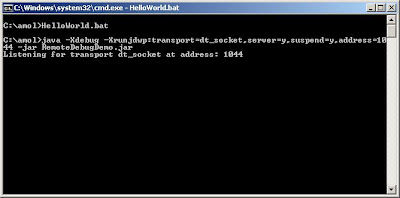
A message is displayed
'Listening for transport dt_socket at address :1044' .
3.Configure Eclipse to connect to the remote JVM
Now I need to connect my eclipse code to this JVM so that I can debug the code.
In Eclipse, I place a breakpoint on the first line in the main method.This is done so that once the eclipse debugger is connected to the remote JVM, it should suspend at the breakpoint.
After this, I open the "debug configuration" screen in eclipse.
Run -> Debug configuration
Here click the 'Remote Java Application' and click 'New'.
Here I specify following
host : localhost port :1044
This means that I want to connect to the JVM running on localhost and listening to port 1044 for incoming connections.
Specify the details as shown in the screen shot below:
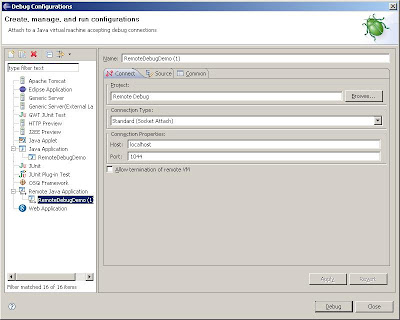
On clicking the debug button, a connection is established to the java program running in batch mode and the code can be debugged.
You can use this remote debug feature in situations like
To demonstrate how you can remotely debug java programs remotely, I will do the following:
- Create a .bat file that calls the java program
- Configure the arguments to the JVM so that the JVM will be capable of being remotely debugged
- Configure Eclipse to connect to the remote JVM
I create a java class given below:
public class RemoteDebugDemo {
    public static void main(String[] args)
    {
        System.out.println("STEP 1");
        System.out.println("STEP 2");
        System.out.println("STEP 3");
        System.out.println("STEP 4");
        System.out.println("STEP 5");
        System.out.println("STEP 6");
    }
}
Now I wish to run this program in batch mode.So I write a file called RemoteDebugDemo.bat file with following content.java -jar RemoteDebugDemo.jar
I create a jar file named RemoteDebugDemo.jar containing the RemoteDebugDemo class.
(If you wish to know how to create a jar file using eclipse, you can refer this article on how to create jar files using eclipse).
2. Configure the parameters to the JVM so that the JVM will be capable of being remotely debugged
Now to remotely debug the RemoteDebugDemo.bat file, I modify the batch file content as follows:
java -Xdebug -Xrunjdwp:transport=dt_socket,server=y,suspend=y,address=1044 -jar RemoteDebugDemo.jarThese are the java debugger jdb parameters.
The transport = dt_socket instructs the JVM that the debugger connections will be made through a socket.The address=1044 parameter indicates the port number. suspend=y means that the jvm will start in suspended mode and will stay in suspended mode until the debugger is attached to it.
In this case my JVM is on localhost.It can lie anywhere in the network.You will need to know the IP address and the port number of the host for enabling remote debug.
Now I place the 2 files RemoteDebugDemo.jar and RemoteDebugDemo.bat in folder "C:\amol\" and run the batch script as shown below.

A message is displayed
'Listening for transport dt_socket at address :1044' .
3.Configure Eclipse to connect to the remote JVM
Now I need to connect my eclipse code to this JVM so that I can debug the code.
In Eclipse, I place a breakpoint on the first line in the main method.This is done so that once the eclipse debugger is connected to the remote JVM, it should suspend at the breakpoint.
After this, I open the "debug configuration" screen in eclipse.
Run -> Debug configuration
Here click the 'Remote Java Application' and click 'New'.
Here I specify following
host : localhost port :1044
This means that I want to connect to the JVM running on localhost and listening to port 1044 for incoming connections.
Specify the details as shown in the screen shot below:

On clicking the debug button, a connection is established to the java program running in batch mode and the code can be debugged.
You can use this remote debug feature in situations like
- Debugging in eclipse while running the actual application in windows command prompt in same machine or a distant machine in the network
- Debugging in eclipse while running the actual application in unix or unix based OS
- Debugging in eclipse in windows and the program running on a distant unix machine in the network
where I need to set this parameters ?
ReplyDeletejava -Xdebug -Xrunjdwp:transport=dt_socket,server=y,suspend=y,address=1044 -jar RemoteDebugDemo.jar
on Linux box ?
getting below error
-Xdebug: illegal argument
Usage: java [-options] class
You need to give these parameters as arguments to the JVM, just like you give the classpath.You got that error because probably you typed it incorrectly.Try changing the order of the arguments.
Delete